Example usage
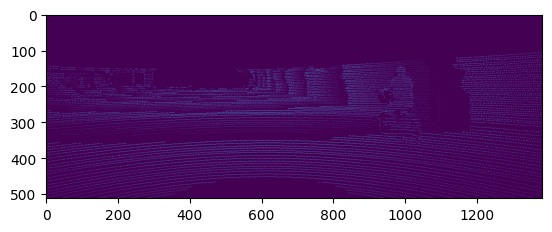
Here we will demonstrate how to use utils3d to convert your 3D point clouds into a 2D depth image.
Imports
from utils3d.pctodepthimage import pctodepthimage
import numpy as np
from matplotlib.pyplot import imshow
Jupyter environment detected. Enabling Open3D WebVisualizer.
[Open3D INFO] WebRTC GUI backend enabled.
[Open3D INFO] WebRTCWindowSystem: HTTP handshake server disabled.
Declare the required parameters
path = "../pointclouds/um_000000.pcd"

extrinsics = np.array([[7.533745000000e-03, -9.999714000000e-01, -6.166020000000e-04, -4.069766000000e-03],
                      [1.480249000000e-02, 7.280733000000e-04, -9.998902000000e-01, -7.631618000000e-02],
                      [9.998621000000e-01, 7.523790000000e-03, 1.480755000000e-02, -2.717806000000e-01]])

intrinsics = np.array([[7.215377000000e+02, 0.000000000000e+00, 6.095593000000e+02],
                      [0.000000000000e+00, 7.215377000000e+02, 1.728540000000e+02],
                      [0.000000000000e+00, 0.000000000000e+00, 1.000000000000e+00]])

height = 512
width = 1382
scaling_factor = 0.15
Calling the pctodepthimage function
depth_image = pctodepthimage(path, extrinsics, intrinsics, height, width, scaling_factor)
imshow(depth_image)
depth_image.show()
/usr/bin/xdg-open: 882: www-browser: not found
/usr/bin/xdg-open: 882: links2: not found
/usr/bin/xdg-open: 882: elinks: not found
/usr/bin/xdg-open: 882: links: not found
/usr/bin/xdg-open: 882: lynx: not found
/usr/bin/xdg-open: 882: w3m: not found
xdg-open: no method available for opening '/tmp/tmpz6vn1zn9.PNG'