Example usage
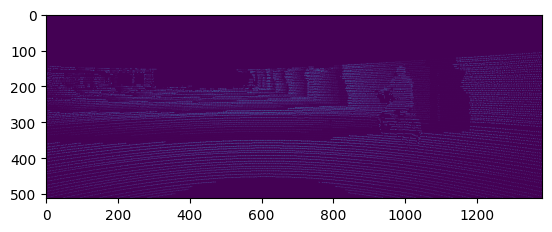
Here we will demonstrate how to use utils3d to convert your 3D point clouds into a 2D depth image.
Imports
from utils3d.pctodepthimage import pctodepthimage
import numpy as np
from matplotlib.pyplot import imshow
Jupyter environment detected. Enabling Open3D WebVisualizer.
[Open3D INFO] WebRTC GUI backend enabled.
[Open3D INFO] WebRTCWindowSystem: HTTP handshake server disabled.
Matplotlib is building the font cache; this may take a moment.
---------------------------------------------------------------------------
KeyboardInterrupt                         Traceback (most recent call last)
Cell In[1], line 3
      1 from utils3d.pctodepthimage import pctodepthimage
      2 import numpy as np
----> 3 from matplotlib.pyplot import imshow

File ~/checkouts/readthedocs.org/user_builds/utils3d/envs/latest/lib/python3.9/site-packages/matplotlib/pyplot.py:52
     50 from cycler import cycler
     51 import matplotlib
---> 52 import matplotlib.colorbar
     53 import matplotlib.image
     54 from matplotlib import _api

File ~/checkouts/readthedocs.org/user_builds/utils3d/envs/latest/lib/python3.9/site-packages/matplotlib/colorbar.py:19
     16 import numpy as np
     18 import matplotlib as mpl
---> 19 from matplotlib import _api, cbook, collections, cm, colors, contour, ticker
     20 import matplotlib.artist as martist
     21 import matplotlib.patches as mpatches

File ~/checkouts/readthedocs.org/user_builds/utils3d/envs/latest/lib/python3.9/site-packages/matplotlib/contour.py:13
     11 import matplotlib as mpl
     12 from matplotlib import _api, _docstring
---> 13 from matplotlib.backend_bases import MouseButton
     14 from matplotlib.text import Text
     15 import matplotlib.path as mpath

File ~/checkouts/readthedocs.org/user_builds/utils3d/envs/latest/lib/python3.9/site-packages/matplotlib/backend_bases.py:45
     42 import numpy as np
     44 import matplotlib as mpl
---> 45 from matplotlib import (
     46     _api, backend_tools as tools, cbook, colors, _docstring, text,
     47     _tight_bbox, transforms, widgets, get_backend, is_interactive, rcParams)
     48 from matplotlib._pylab_helpers import Gcf
     49 from matplotlib.backend_managers import ToolManager

File ~/checkouts/readthedocs.org/user_builds/utils3d/envs/latest/lib/python3.9/site-packages/matplotlib/text.py:16
     14 from . import _api, artist, cbook, _docstring
     15 from .artist import Artist
---> 16 from .font_manager import FontProperties
     17 from .patches import FancyArrowPatch, FancyBboxPatch, Rectangle
     18 from .textpath import TextPath, TextToPath  # noqa # Logically located here

File ~/checkouts/readthedocs.org/user_builds/utils3d/envs/latest/lib/python3.9/site-packages/matplotlib/font_manager.py:1551
   1547     _log.info("generated new fontManager")
   1548     return fm
-> 1551 fontManager = _load_fontmanager()
   1552 findfont = fontManager.findfont
   1553 get_font_names = fontManager.get_font_names

File ~/checkouts/readthedocs.org/user_builds/utils3d/envs/latest/lib/python3.9/site-packages/matplotlib/font_manager.py:1545, in _load_fontmanager(try_read_cache)
   1543             _log.debug("Using fontManager instance from %s", fm_path)
   1544             return fm
-> 1545 fm = FontManager()
   1546 json_dump(fm, fm_path)
   1547 _log.info("generated new fontManager")

File ~/checkouts/readthedocs.org/user_builds/utils3d/envs/latest/lib/python3.9/site-packages/matplotlib/font_manager.py:1017, in FontManager.__init__(self, size, weight)
   1014 for path in [*findSystemFonts(paths, fontext=fontext),
   1015              *findSystemFonts(fontext=fontext)]:
   1016     try:
-> 1017         self.addfont(path)
   1018     except OSError as exc:
   1019         _log.info("Failed to open font file %s: %s", path, exc)

File ~/checkouts/readthedocs.org/user_builds/utils3d/envs/latest/lib/python3.9/site-packages/matplotlib/font_manager.py:1044, in FontManager.addfont(self, path)
   1042     self.afmlist.append(prop)
   1043 else:
-> 1044     font = ft2font.FT2Font(path)
   1045     prop = ttfFontProperty(font)
   1046     self.ttflist.append(prop)

KeyboardInterrupt:
Declare the required parameters
path = "../pointclouds/um_000000.pcd"

extrinsics = np.array([[7.533745000000e-03, -9.999714000000e-01, -6.166020000000e-04, -4.069766000000e-03],
                      [1.480249000000e-02, 7.280733000000e-04, -9.998902000000e-01, -7.631618000000e-02],
                      [9.998621000000e-01, 7.523790000000e-03, 1.480755000000e-02, -2.717806000000e-01]])

intrinsics = np.array([[7.215377000000e+02, 0.000000000000e+00, 6.095593000000e+02],
                      [0.000000000000e+00, 7.215377000000e+02, 1.728540000000e+02],
                      [0.000000000000e+00, 0.000000000000e+00, 1.000000000000e+00]])

height = 512
width = 1382
scaling_factor = 0.15
Calling the pctodepthimage function
depth_image = pctodepthimage(path, extrinsics, intrinsics, height, width, scaling_factor)
imshow(depth_image)
depth_image.show()